Lorem ipsum dolor sit amet, consectetur adipiscing elit. Morbi eu sem ultrices, porttitor mi eu, euismod ante. Maecenas vitae velit dignissim velit rutrum gravida sit amet eget risus. Donec sit amet mollis nisi, nec commodo est.
Lorem ipsum dolor sit amet, consectetur adipiscing elit. Morbi eu sem ultrices, porttitor mi eu, euismod ante. Maecenas vitae velit dignissim velit rutrum gravida sit amet eget risus. Donec sit amet mollis nisi, nec commodo est.
ComputerYou can setup Counter-Strike 1.6 Server on any computer. This tutorial is for computers running Windows Operating System (Windows XP / Windows Server 2003 / Windows 7)
Internet ConnectionFor Online Server, an Internet Connection is required. This tutorial is for home computers running on DSL Connection or WiMAX connection. For 16 slots server, a 1Mb internet connection is sufficient. For best performance, a 4Mb internet connection is preferred which can support upto 32 players.
Static IPThe Public IP address of dsl connections is Dynamic. Which means on every restart of router the Public IP is changed. To make the IP static you have to request your DSL provider to provide you a Static IP address. PTCL users can get Static IP easily for a monthly charge of 200 rupees. Call 1218 from your ptcl number to get a Static IP on your dsl connection.
UPSTo make your server 24/7 your computer must stay on all the times. For that you will need a UPS that will provide backup in case of power outages.
Installation Steps
Download Server Download Dedicated Server Setup from here hlds_cspak.zip Extract the zip file to any folder.
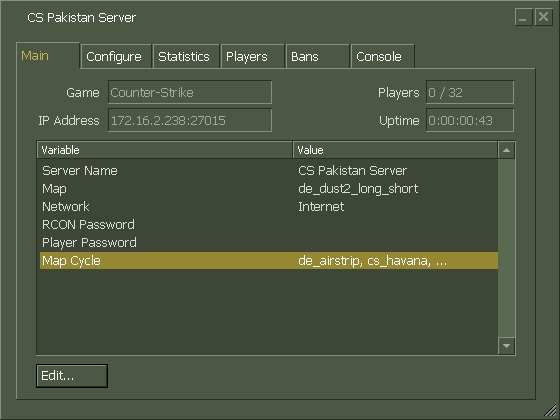
Server Configuration Open server.cfg file in cstrike folder and change “CS 1.6 Server by CounterStrike.Com.Pk” to server name of your choice. Right-Click on START_SERVER.bat file and click Edit. Make any required changes and save the files by pressing Ctrl + s Now Double-Click on START_SERVER.bat If everything goes fine, the server console will be started like below.
Testing This step is just to make sure that you have properly configured the server. Open your game and click on Add Server. Enter your Private IP with Port and click Add. If you can see your server running, you can proceed to the next step.
Lorem ipsum dolor sit amet, consectetur adipiscing elit. Morbi eu sem ultrices, porttitor mi eu, euismod ante. Maecenas vitae velit dignissim velit rutrum gravida sit amet eget risus. Donec sit amet mollis nisi, nec commodo est.
Lorem ipsum dolor sit amet, consectetur adipiscing elit. Morbi eu sem ultrices, porttitor mi eu, euismod ante. Maecenas vitae velit dignissim velit rutrum gravida sit amet eget risus. Donec sit amet mollis nisi, nec commodo est.